
MPC 3.10.1 is out, and I’m choosing my words carefully: Akai just changed the game. For weeks now we’ve been talking about open source, cracked firmwares, machines being opened up. Two weeks ago, in my video on the Behringer Kick, I said it would be really good news if it pushed Akai to open up its machines. Well, here we are.
The update is available now, for the MPCs and the Forces. Heads up: no new sound engine, no new effect. What changes is what you’re allowed to do with your machine. I’m not going to read you a press release: I tested everything live on my MPC Live 3.
Enabling the beta features of MPC 3.10.1
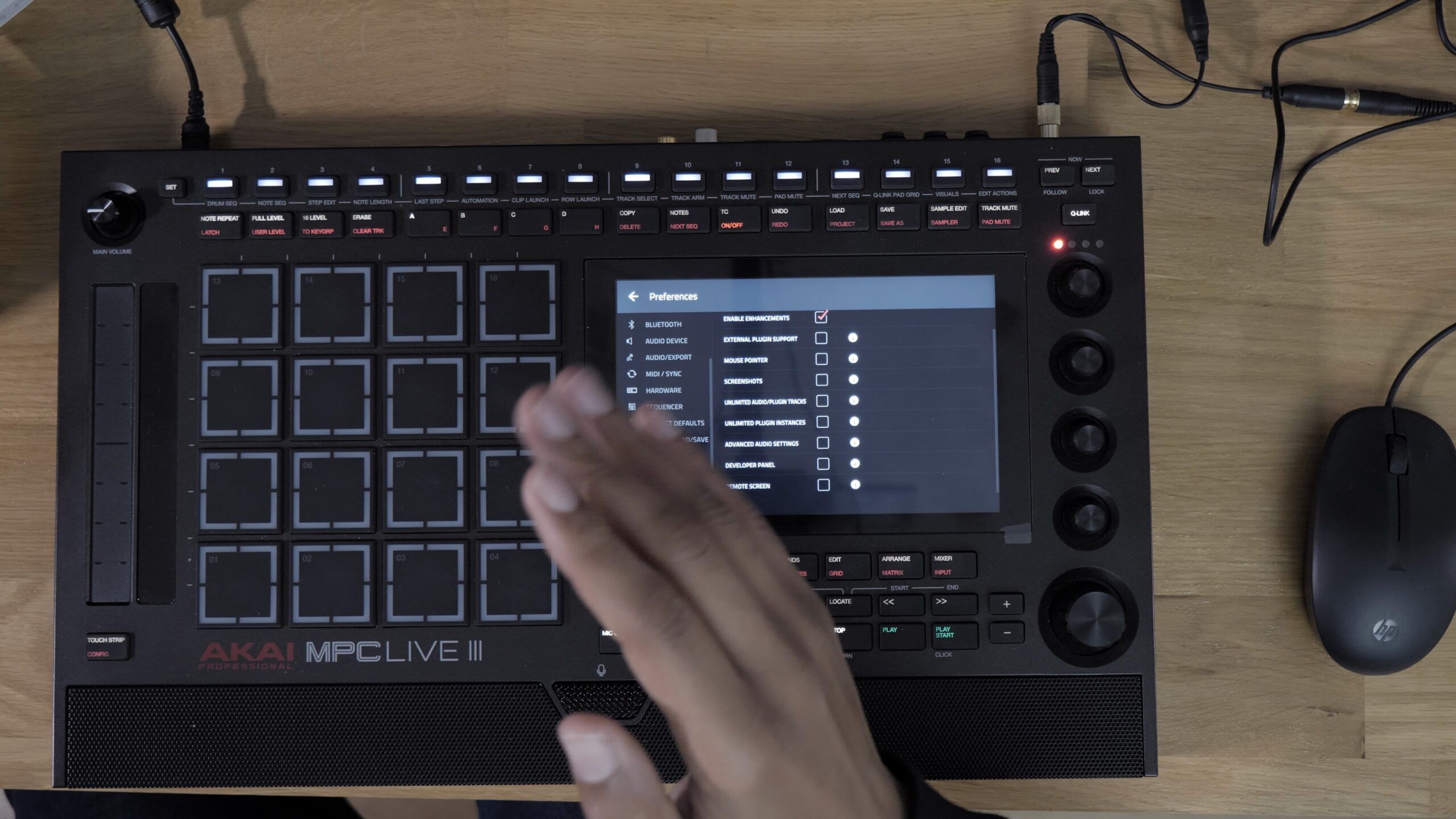
It all happens in Menu, Preferences. On the side, you scroll down to Enhancements, then tick Enable Enhancements. The MPC warns you: these are beta features, offered for testing, and they can make your projects unstable. So let’s be careful.
Once the box is ticked, here’s what you unlock:
- Enable Plugin Support: external plugins
- Mouse Pointer: the mouse
- Screenshot: screen capture
- Unlimited Audio/Plugin Tracks and Unlimited Plugin Instances: as many tracks and instances as you want
- Advanced Audio Settings: set the buffer and latency of the audio interface
- Developer Panel: the shell
- Remote Screen: the MPC’s screen on your computer
Mouse and screen capture on the MPC
I’ve always dreamed of doing this. I plug in a wired mouse, enable Mouse Pointer, and a pointer appears. With a Bluetooth mouse, it was detected but I never got a pointer. Maybe I’m just doing it wrong: tell me in the comments if you got it to work.
The real eye-opener is in Arrange mode: I can select events with the mouse, and even move them. I’d always wondered why we couldn’t do it like in Pro Tools instead of struggling with our big fingers… Game changer. Hacks already let you do it, but I’d never installed them. Now it’s official, with no fear of damaging your machine.
Screen capture gave me a bit of trouble. The right move: hold Shift and the four bank buttons A, B, C, D. You then choose the folder, and it saves a PNG. I had the feeling those buttons also changed the bank or the pad mode along the way, so it’s not very clear yet.
Remote Screen: the MPC’s screen on your computer
When you enable Remote Screen, the MPC shows an IP address on your local network and a password (which you can change). In a browser, I just got an error. That address is mainly for the MPC Remote Screen Viewer app, which you download from GitHub, on Mac or Windows (maybe Linux too, I can’t remember).
I type in the password, and I’ve got the MPC’s touchscreen on my computer. It isn’t controlled by the computer’s mouse, but the mouse plugged into the MPC works. And above all, you can record a video of what’s happening on screen (in my Videos folder, for me) and take pictures. There’s also an option to share the audio, which I haven’t tested. For a content creator, it’s a complete tool. I could use it for my courses. Well done, Akai.
Developer Panel and Linux shell: watch out for your network
François, from the French The Lab community, had already sent me a video of the shell. Honestly, when you show this to a former dev, he goes crazy. I pair a small Bluetooth keyboard (Menu, Preferences, Bluetooth, then Pair), open the Developer Panel, type ls, and I see the folders at the root of the machine. You also get views of the resources: 8 cores, disk space, voice info. Maybe this is the kind of tool Native Instruments used to develop its plugins, but that’s just a guess.
Now I’m speaking as a developer, that’s my job: this mode opens full access to your machine, with no password, for anyone on your network. At home, no problem. In a concert venue, on public Wi-Fi or in a shared studio, you switch it off. This isn’t paranoia: their own documentation says so.
VST2 external plugins and the SDK: what really changes
The real story is third-party plugins. Until now, officially, the plugins on your MPC were Akai’s, full stop. Now you create a VST2 plugin folder at the root of a USB stick, a drive or an SD card, and they show up in a new external plugins menu. No tinkering, no command line.
Akai is also releasing an official SDK, for free: the toolbox and the instructions to develop on the machine. Machines covered: MPC X, X SE, Live, Live 2, One, One+, Key 61, Key 37, Force, and the recent Live 3 and MPC XL. inMusic’s technical director, Pete Goodleaf, says he gave felt piano samples to an AI (Claude, I think he says), which built the plugin along with its interface. The SDK’s instructions are actually written for an AI, with example sentences to give it.
Let’s be honest: between a plugin that works and a plugin that sounds good, there’s a world of difference. And I know what you’re wondering: your computer plugins on the MPC? No. VST2 is the old format, and your MPC runs Linux on an ARM processor, whereas your plugins are made for Windows or Mac. A developer who has the code can recompile it. Other limits: the interface is limited to knobs, buttons and images, and a plugin can’t send notes to your other tracks through the official route.
There’s already OpenMPC, a community catalogue of more than 200 free plugins, which now installs without hacking anything. But it isn’t Akai, the main developer is anonymous, nothing is vetted: if it crashes, that’s on you. Not the night before a gig.
The real announcement: a replaceable OS for MPC and MPC Sample
This one isn’t in the official video. The technical director drops it casually in an interview: they’re going to open up the whole operating system so people can replace it, and fully support it. Not in this update: in a few weeks, for the MPC and the MPC Sample. Against the risk of breaking the machine, a switch: an experimental mode for tinkering, a safe mode for the gig.
He also says it’s the news of the last few weeks that pushed them to release all this now. The community started the movement, Akai sped up so as not to watch the train go by, and I find that honest. Along with it: MPC Sample 1.4 with its own kit for building effects (not out yet), and two official plugins, an SP-1200 emulation called MPC SP and the R4K Console Channel Strip. In the video, I also show you my own firmware on the MPC Sample, with my logo, my jingle and a little tutorial.
My take on MPC 3.10.1
We need to be precise about one word: today, this isn’t open source yet. Akai isn’t giving out the MPC’s code. They’re opening a side door, a sandbox where you plug in plugins without touching the system. The real turning point is the replaceable OS, and I’m waiting for that one with bated breath before I applaud.
What impresses me is that Akai could have sent in the lawyers. Instead they released a development kit, and the community project switched over to it. Everyone’s on the same side, and that commands respect. My opinion, nothing more: the next step might be the hardware. We’re nowhere near that.
And you, are you going to tick the box, even if you’re not a tinkerer? Or do you prefer your MPC nice and closed, nice and stable? Tell me in the comments. Chase your dreams all the way!
Read also
- MPC 3.10: 64 pads, Arrange mode and MPC 3 Desktop finally stable
- Behringer Kick and Akai Sample Key: fact and fiction about the MPC
- SampQOL MPC Sample: 16 tracks and per-pad effects, but closed code
Leave a Reply