
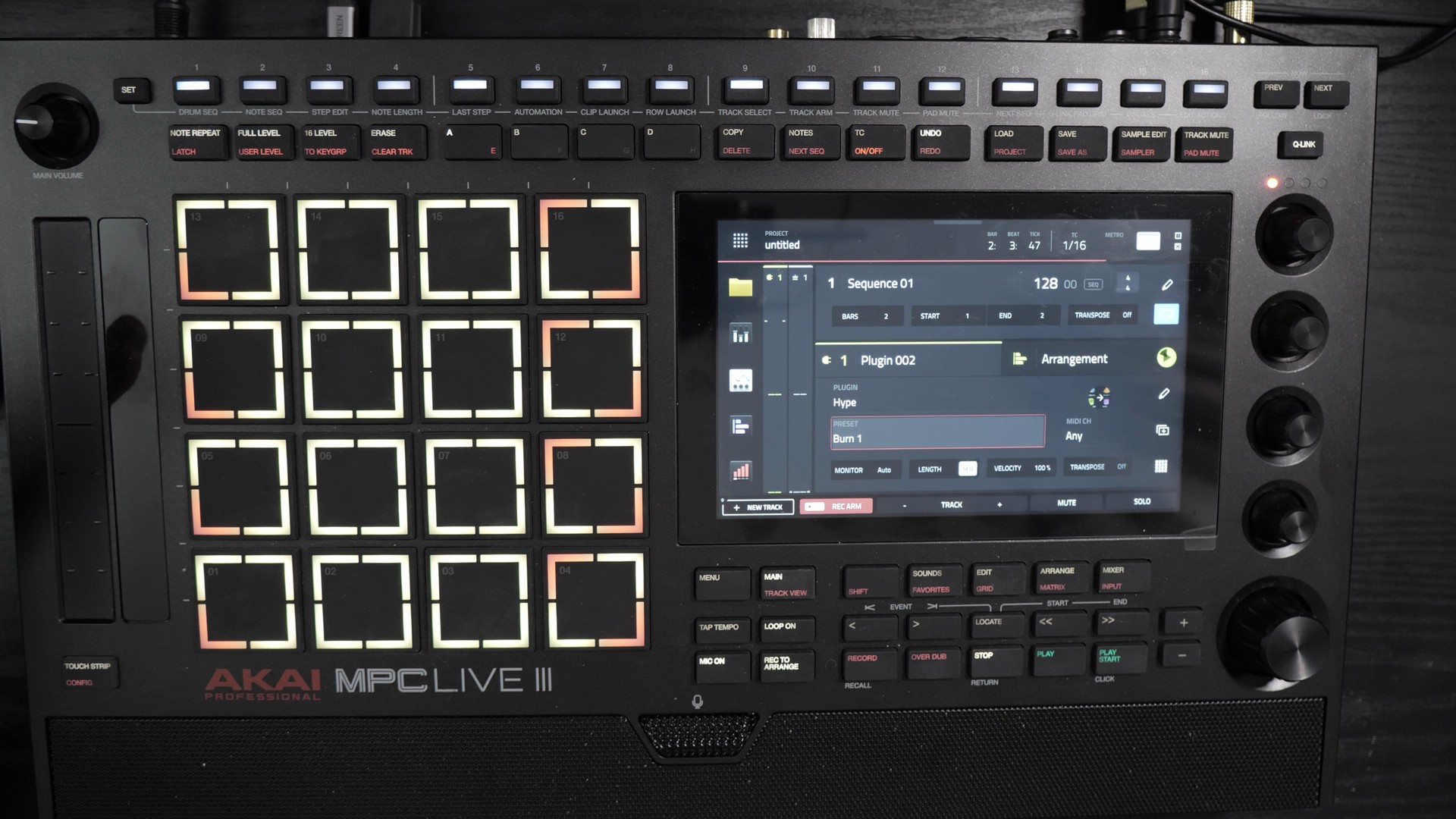
The MPC 3.10 update is out and it affects everyone. MPC 3 on computer finally leaves beta, Arrange mode gets a lot more practical with three new selection modes, and if you have a Live III or an XL, your pads can now split: one pad becomes four, so 64 pads in total.
I’m also using it to come back after six months without a video. I’ll be transparent: I’ve gone back to a job, French The Beatmaker never paid my bills, and I hesitated about coming back. I’m easing back in, more simply. In the video, I test everything live on my MPC Live III, with my discoveries and my fails. Here’s the essentials.
Before moving to MPC 3.10
First thing: back up your projects before updating. Also be aware that MPC 3 projects are still not compatible with MPC 2 Software.
To install 3.10, you have several options. Normally, the MPC should offer it to you directly if you’re connected to Wi-Fi (I wouldn’t be surprised if it’s already done on yours). Otherwise, you can go through a USB stick or through inMusic Software. The method hasn’t changed much from one version to the next.
64 pads in Notes mode on Live III and XL
I know, it’s a shame for everyone else, but that’s how it is: this new feature is reserved for the MPC Live III and the MPC XL. Their MPE pads already have the corners marked, and that’s where it all happens. You hold the A button, and you choose between the classic 4×4 mode and the 8×8, 64 pads mode.
In 8×8, each corner of a pad is a pad. The root notes, which are red in normal mode, now show up in red on the corners. In practice, you get more octaves under your fingers. If you aim for the corners carefully, it seems very precise.
Where it gets interesting is for glides. With a lead in glide mode, you can play a C much further away than in 4×4: there’s a lot more possible distance between notes, right under your hand. Will it be useful to you? I think so, in some cases. Personally, I prefer playing on a keyboard anyway.
Another discovery made live: on a drum track, the 64 pads show banks A, B, C and D at the same time (16 pads each). To record my cymbals, I still went back to 16 pads, it was more practical.
Clip Launch in 8×8
The most interesting thing with these 64 pads is Clip Launch. You switch to Matrix mode (double-click on the Live III), and each lit pad is a clip.
The result: you have many more clips under your fingers and you create your variations more easily. In 4×4, you can also reach the other clips, but you have to move the view. Here, everything is directly accessible. It’s getting closer to a Force-style interface, even if it’s not the same yet.
Arrange mode: Marquee, Track and Range
For me, this is the real plus of this update, and it affects everyone. Arrange mode gets three selection buttons: Marquee, Track and Range.
Quick tip along the way: on the Live III, check that you’re in Record to Arrange and not Record to Clip, otherwise nothing gets recorded in the arrangement. It caught me out live.
Before, editing notes from this view was rather annoying. Now you can edit much more easily from the Arrange view. You just need to get your head around how it works.
- Marquee: you select a note or a group of notes, even across different tracks. Edit then Duplicate duplicates them (careful, it overwrites the notes that follow). You can also copy and paste at the playhead.
- Loop to Marquee: it sets the loop to your selection, but the unit is still the bar. I find that a bit of a shame, but it’s already handy.
- Track: you select the whole track over the length of the loop. Duplicate copies the track and moves the loop onto the copy, handy for working on a section like the intro.
- Range: you navigate and drag more easily, and you can duplicate the whole arrangement in one go.
MPC 3 Desktop and MPK Mini IV
On the computer side, MPC 3 Desktop is finally out of beta. That’s reassuring: you can work on it without wondering whether it’s going to work. It can still crash, nothing’s perfect, but the version is considered stable. And you can now use it as a plugin in your music software, like Pro Tools. I’m thinking of testing it there.
I also plugged my MPK Mini IV back in. Before, it was recognised but didn’t integrate properly with the MPC, and I complained about it. Now its little screen shows the name of the track and the preset, you can change presets, and the main knob gives access to track volumes and submixes. There’s also a button that opens Studio Instrument Collection (I haven’t tested it, but I think that’s what it’s for). One limit I noticed: the Note Repeat button doesn’t activate the MPC’s Note Repeat.
The MPK Mini Plus 2 looks even better optimised, from what I’ve seen. And if you use MPC Beats, the free version, you can now enable the MPC 3 workflow (not tested yet).
The small improvements
3.10 also brings lots of small things, which I haven’t all tested:
- Moving loops with the wheel in Arrange
- Faster plugin search, according to Akai
- On computer, expansions stored on an external drive are finally detected (I had hacked together symbolic links)
- Fix for the risk of internal drive corruption on the Live III and XL
Should you update to MPC 3.10?
A warning first. A community has formed to hack MPCs and install plugins on them, VST-style. As a pure geek, I found that brilliant. But 3.10 now blocks the exploit that was discovered. If you want to have fun modifying your MPC’s firmware (at the risk of bricking it), don’t move to 3.10.
Otherwise, I strongly recommend updating, especially for the new arrangement features. It’s a comfort update that will probably improve your workflow in Arrange mode. I’m sure it will for mine. And if you have a Live III or an XL, Clip Launch in 8×8 is really worth it, depending on how you work.
Thank you to all of you who have supported me from the start, on YouTube as well as on French The Lab. And you, what do you think of these 64 pads on your Live III or your XL? Tell me in the comments. Chase your dreams all the way!.
Leave a Reply